


Referencing LOGS Content in Notebook

Apr 13, 2026
 1
1
The notebook’s key functionality is referencing LOGS entities (datasets, samples, and more) to you experimental descriptions.
Insert LOGS Content
1. Open an entry in Edit mode.
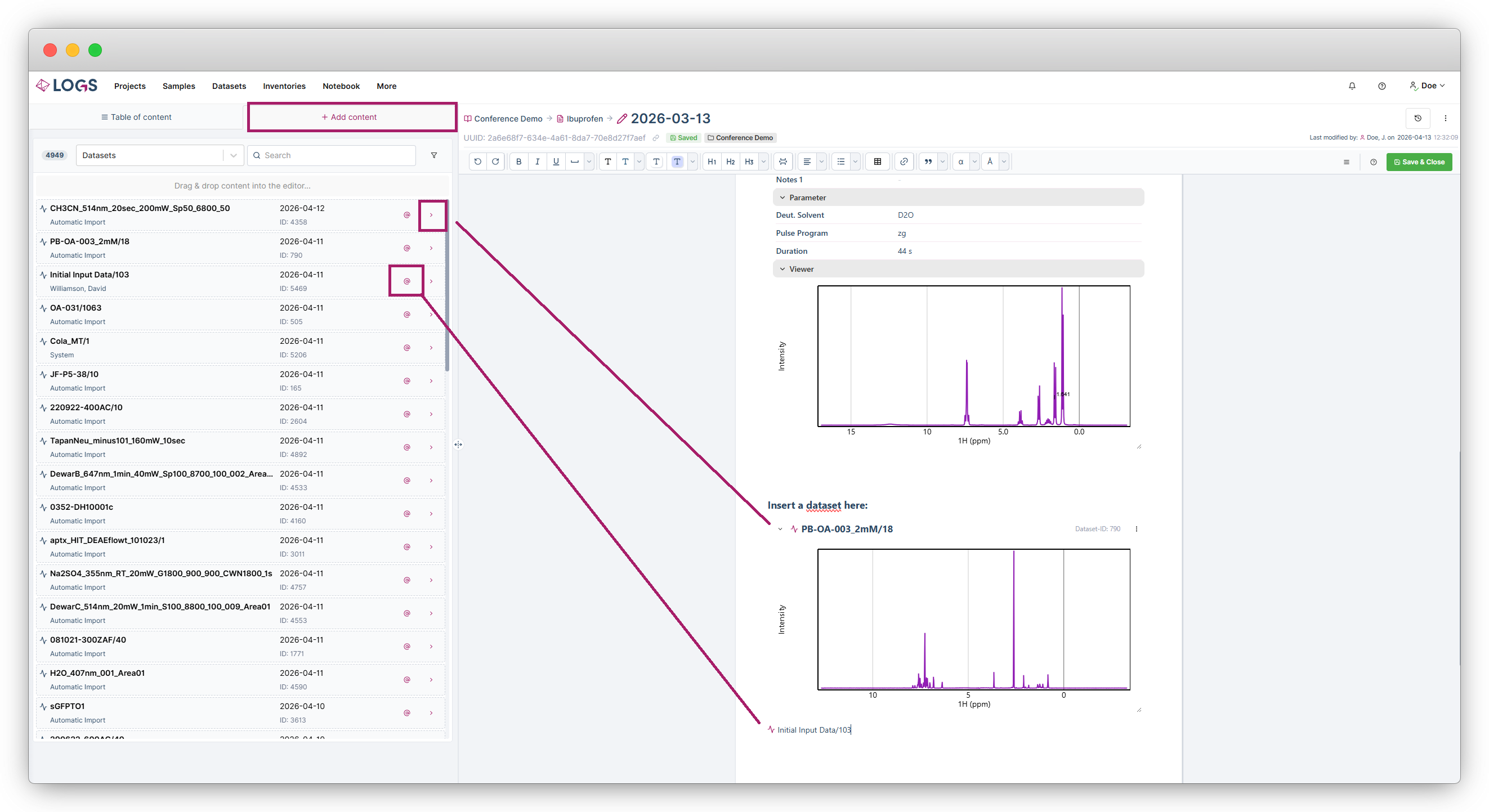
2. Click Add Content in the left sidebar.
3. Select an entity type (Datasets, Samples, or other items).
4. Search using the search bar and filters, or navigate chronologically.
Insertion Options
- Insert a link via the @ symbol
- Insert a Preview/Viewer via the arrow icon
- Drag & drop content directly into the editor
Content is inserted at the current cursor position.
Alternatively you can use the shortcut @dataset:(dataset name or ID).
Dataset Actions within an Entry
For inserted datasets, the three dot menu offers:
- Got to dataset/attachement/sample etc.
- Hide/Show header
- Colapse
- Hide/Show viewer
- Hide/Show details (datasets only)
- Hide/Show source information (satasets only)
- Hide/Show parameters (datasets only)
- Remove reference

